


Devenez des experts du planificateur en consultant les différentes étapes nécessaires pour mener votre projet à terme. Notre planificateur vous offre l’autonomie de créer votre projet et de parcourir les différentes options disponibles.
PLAN BUILDER USER GUIDE
To find out about our prices and to purchase Procam Distribution products, simply register on our website by clicking on the following link :
My account – Distribution Procam (procamdistribution.ca)
For fences (glass or ornamental), once logged in, you will simply have to click on the “create a new plan” tab.
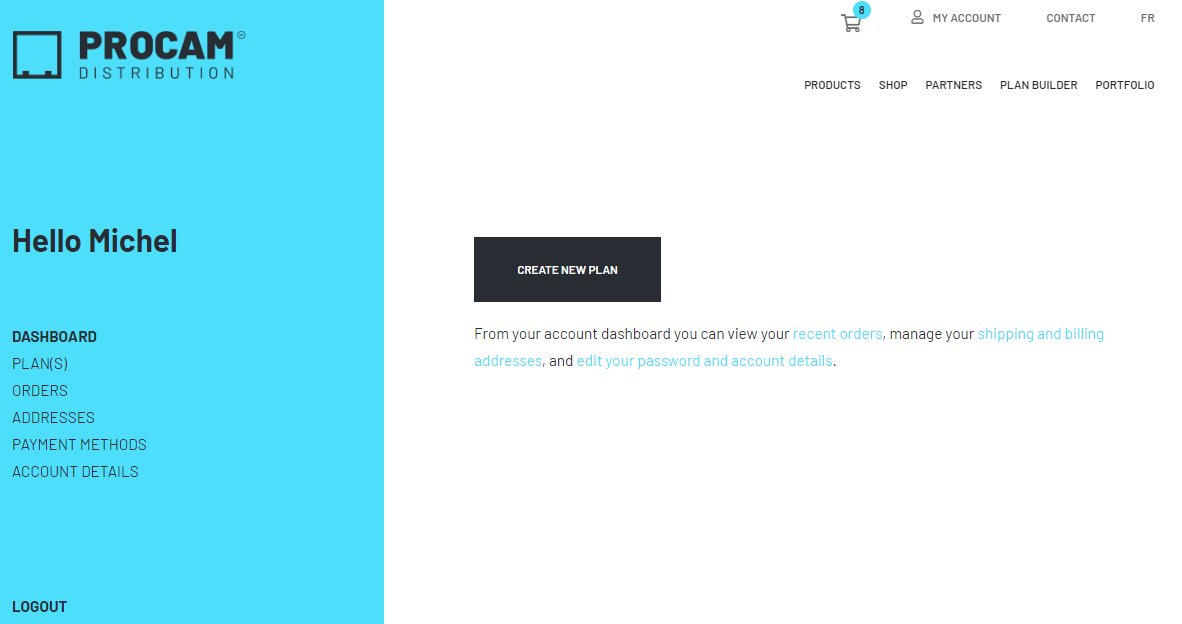
Then, the steps to use the planner are very simple :
STEP 1
Choose the type of project and the number of sides. For example :
1 right angle (even with single or double door) = 1 side / L-shaped = 2 sides / Rectangle = 4 sides / Pentagon = 5 sides
Then you enter the lengths for EACH of the sides*. The builder assumes that the sides are touching and takes into account that the panels must stop corner to corner in the case of a glass project.

*It is important that all sides are completed in order to proceed to the next step!
If the lengths are the exact dimension to be covered, you must enter -57 and -57 in the “Left nosing” and “Right nosing” boxes.

If you wish to add a door to your glass project choose the 900mm hinge panel for added strength.

You can specify whether the side should be attached to the wall. Just press the button ”Touch a wall?”

STEP 2
For the glass:
If you want to add corners or wall ties, remember to add the ”corner(s)” as needed. You can decide to add wall ties for more strength.
For ornamental:
You must choose the type of posts you want (in the ground or with plates).
If your sides are independent, you will need to add a 2 ½” post for each of these sides! ** the builde rincludes 2 ½” posts for corners and doors, and 2” posts between panels.
STEP 3
View the result of the plan you have created.
STEP 4
Check the price before taxes and determine the delivery method. You also have the possibility to :
- Add your files;
- Save your plan;
- Print your plan.
Then, add it to the cart to place the order and/or see the exact price with taxes and delivery. ** It is important to validate the delivery address. The postal code defines the delivery cost.
Are you interested in our pergolas? You can view and order them on our online store directly!

You will also find our manual and automatic mosquito nets/umbrellas as well as our partners and contact details.

Do not hesitate to contact us for more information or to validate your plan!
Regards,